 Back in November last year i broke the news ofGoogle Web Fonts being added to the Bloggertemplate designer.At the time this feature was added to Blogger In Draft a kind of test version of blogger used to try out new additions to the service.Today after a successful test period the fonts have been added to the main Blogger site.Not only this an extra 35 excellent fonts have been added for you bringing the total to 77.Lets look at some of the fonts and how you can use them on your blog.
This great new feature gives you the option to use stylish fonts on your blog with just a click of your mouse.Over the years using a custom font on your blog was a hard process, the launch of Google web fonts made it somewhat easier but you still needed to add sections of code to your template.
Blogger Template Designer Fonts
I added some of the fonts to a test blog for you to see how they look - Blogger Template Fonts.Among the fonts available are some of the most popular Simple Stylish Fonts, Handwriting Fonts, Impact Fonts, Gothic Fonts and a few quiet odd fonts.You can add different fonts to every section of your blog such as the Blog Title and Post title as well as the main font throughout.One of the fonts i use on Spice Up Your Blog called Lobster is now available.You can see the Lobster font in the Blog Title and Sidebar titles at the time of writing and it's defiantly one of my favorite fonts.

Using Fonts On Your Blog
To change the fonts on your blog simply click the Design link in your dashboard then the template designer link.Under the Advanced option you can start browsing through the fonts.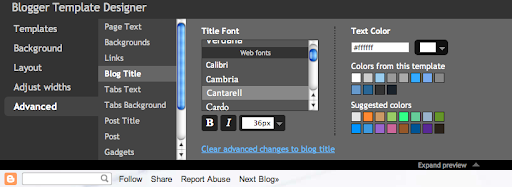
Remember you can play around with different fonts in the preview, as long as you don't save the changes wont take effect.


0 comments:
Post a Comment